Sunday, May 28, 2017
How To Install Official TeamEOS 5 1 1 Lollipop on Zenfone 2
How To Install Official TeamEOS 5 1 1 Lollipop on Zenfone 2
![[Official] TeamEOS 5.1.1 Lollipop on Zenfone 2](https://blogger.googleusercontent.com/img/b/R29vZ2xl/AVvXsEiwFPmvkLtQFkoXQx1BWaufm8I-OTBySQOLT_Ez3CYTDh5Z6NwHY8cLzQQAxEG_N8ysRQ0ID1K3mMwlkvCNVV4jjfX1D-Y6f88we3C0YuDBRD3F0MCxD5yxs21hIICEhF9Yrjjd_4qgOcQ/s640/%255BOfficial%255D+TeamEOS+5.1.1+Lollipop+on+Zenfone+2.png "How To Install [Official] TeamEOS 5.1.1 Lollipop on Zenfone 2")
[ROM] TeamEOS Features for Zenfone 2
- NX Gesture Navigation Bar
- Re-sizable Navigation Bar
- Ambient Display
- EOS Wallpaper Showcase
- Custom Quick Toggles/Tiles
- Soft-key Long-Press and Double-Tap Actions
- Screen Recording
- Network Indicator (WiP)
- Dynamic Volume Steps
- CM12 Theme Engine
- Volume keys switch depending on rotation. So the volume up key is always either on the top or to the right of volume down. (Toggle-able)
- Default Volume Control Stream (Ring or Media)
- Advanced power menu with reboot options.
- Pre-Optimized OATs for better ART performance
- MUCH MORE...
How To Install TeamEOS on Zenfone 2
Step 1. Make sure you are rooted.Step 2. Make sure youre running a proper working custom recovery. If you are not install custom recovery on your phone. Please first install it by your self.
Step 3. Download and Copy Gapps and TeamEOS ROM to your SDCard.
Step 4. Boot into Recovery.
Step 5. Perform a FULL factory wipe and wipe/system and dalvik cache as a precaution.
Step 6. Flash TeamEOS.
Step 7. Flash Gapps zip from SDCard.
Step 8. Reboot, First boot may take up to 10 minutes.
In this Tutorial We shared Install [Official] TeamEOS 5.1.1 Lollipop on Zenfone 2 ZE551ML (Z00A)/ ZE550ML (Z008) with step by step tutorial. When You install Custom Rom and try to root your device your warranty void automatically. We are not responsible for bricked devices, dead SD cards, do some research if you have any concerns about features included in this ROM before flashing it.
Go to link download

Saturday, May 27, 2017
CyanogenMod 13 for Yu Yunique Android 6 0 Official Update
CyanogenMod 13 for Yu Yunique Android 6 0 Official Update
- Android 6.0.1 ROM
- GApps for Marshmallow
- Battery charged at lest 50%
- TWRP Recovery Pre Installed on your Android device
- USB Drivers Pre-installed on your windows PC
How to backup stock ROM using TWRP Recovery
- Power Off your device
- Reboot into recovery
- Tap on Backup
- Check System, Data, Boot, Recovery and EFS.
- Once it is selected Swipe to start to backup process. This will backup your whole Android System (Application, Data and app data) but this will not make backups of your internal storage.
- Once its done, Reboot your device and Save TWRP backup folder on your PC.
How to flash CM13 on Yunique
- Download ROM and GApps from end of post.
- Copy both files in your device internal storage.
- Power off your devices.
- Reboot into TWRP recovery (Press Volume Down and Power key at the same time).
- Tap on Wipe > Advance Wipe. Check Dalvik Cache, System, Data and Cache and swip to wipe.
- Go back, Tap on Install and flash ROM zip file on your device.
- Once its done, Similarly, flash the GApps.
- Once it Done, Reboot System.
For first boot it can take up-to 10 to 15 minutes for making application cache file, Please do not turn off at this time. Please drop your comment below if you find any bug and want to share it with us and our other visitors.
Go to link download
Saturday, May 20, 2017
Official Download PERESOGBODANES BLOG Android App Latest Version With Notification For Latest Cheats
Official Download PERESOGBODANES BLOG Android App Latest Version With Notification For Latest Cheats
Hello to all the lovers and followers of this blog, I hope you all are enjoying what we are doing and on this site. We are dedicated to providing you with the latest free browsing tweaks, most affordable data plans, PC tricks,How TOs, tech news and lots more.
Well, I have developed the official application that will let you have all our updates right there at your fingertips. We believe it is one of the best ways to keep you updated and never miss any useful update on this great blog. This new app is designed in a way that you will get notifications on latest working free cheats on your phone
KEY FEATURES OF THE NEW APP
==> Loads pages very fast
==> Displays our recent blog posts
==> Ability to click on blog post title and read it.
==> Simple design for easy navigation and understanding
==> Notification for receiving free latest cheats and updates on your phone
==>Commenting on the blog is now made very easy via this app
==> You can watch our video tutorials via the app
==> This latest version has fixed the bug of opening links from other web browsers
CLICK HERE TO DOWNLOAD

Go to link download
Tuesday, May 16, 2017
Moto G4 Plus Nougat update Download Install Official OTA Firmware
Moto G4 Plus Nougat update Download Install Official OTA Firmware
- A Device running on stock recovery
- Device at-least 60% charged
- Nougat Firmware for Moto G4/G4 Plus (Download from end of the post)
- We are not responsible for any damage to your phone do it with your own risk. But this method is tested on my moto g4 plus (INDIA Variant)
- Take a complete backup of your phone for safer side and then proceed
How to Install Nougat update on Moto G4 Plus
- First enable Debugging mode from settings > About and tap the Build Number 7 times.
- Download Nougat zip firmware file for Moto G4 Plus from below link and save it to internal memory.

- Reboot Moto G4 Plus to Recovery mode by pressing and hold the Volume Down and Power Button.
- Press Volume down once to highlight the Recovery mode option. Press Power button to select it and reboot into recovery mode.
- Now select Apply update from the SD Card.
- Choose the zip file you downloaded and wait to complete the installation process. For installing it can take up to 15 minutes
- Done! Reboot your phone and enjoy.
For first boot it can take up to 10 - 15 minutes for making catch files on this device. So, please keep patience. If you find other bugs or issue with this update, please drop your comment below. Thank you and have a nice day.
Go to link download
Wednesday, April 12, 2017
Windows 10 Download ISO 32 bit 64 bit free official
Windows 10 Download ISO 32 bit 64 bit free official
- An Internet connection.
- Sufficient data storage on a computer
- If you will be installing the operating system for the first time, you will need your Windows product key (xxxxx-xxxxx-xxxxx-xxxxx-xxxxx). For more information about product keys and when they are required, visit the FAQ page.
- For Enterprise editions please visit the Volume Licensing Service Center.
How To Download Windows 10 ISO

Go to link download
Monday, April 3, 2017
How to update LG G5 to nougat Manually Official OTA
How to update LG G5 to nougat Manually Official OTA
Pre-Requirement
- LG G5 Nougat update firmware
- Battery at-least 50% charged
- G5 UP Tool
- G5 DLL FILES (Download all files from end of the post)
- Windows PC
- Make a full backup of your device data like Contacts, WhatsApp, Photos, etc.
How to update G5 to nougat
- First of all download the LG nougat firmware, DLL file and LG UP tool link given at the end of the post.
- Once it downloads install LG UP-TOOL on your Windows PC
- Run LG-UP tool and copy DLL files C:Program FilesLG ElectronicsLGUPmode.
- Now Power off your device
- Boot into Download mode by pressing and holding the volume up button
- Now connecting device to PC using a USB cable.
- Open LG-UP tool and click on the upgrade button and select the firmware file.
- Now click on the start button and start the installation process.
- Now wait until the installation got completed.
Once it done, You can use your device with the new official OTA update. First boot can take up to 10 minutes for making new cache files, so please do not turn off your device it this satiation it can corrupt files or can be brick your device. Please share this post with your friends and family, Comment down below if you have any question.
Go to link download
Friday, March 10, 2017
ZenFone 2 Laser CM14 1 Nougat 7 1 Official ROM
ZenFone 2 Laser CM14 1 Nougat 7 1 Official ROM
Requirement
- Device Running with Custom TWRP Recovery
- Device at least 50% charged
- Nougat ROM (Download all files from end of the post)
- GApps for Nougat
ROM Status
This ROM is stable for Laser but if you find anything wrong on this ROM, please drop your comment below and share bugs or any issue with our other visitors.
How to Install Nougat on Zenfone 2 Laser
- First Download Nougat ROM from the end of the post link given.
- Second Download GApps for Nougat.
- Copy both zip files in your device internal storage.
- Power Off your device
- Boot your device into TWRP recovery mode
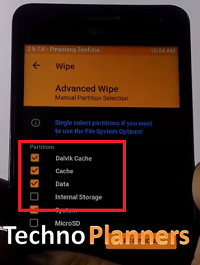
- Once your device boot into TWRP Recovery Mode. Just Select Wipe > Advance Wipe > Check "Dalvik Catch", "Catch", "Data", "System" option and swipe to confirm wipe.
- Go back and Tap on Install option and find Nougat ROM and flash it.
- Once its done, Similarly, flash GApps.
- Go back, Tap on Wipe and select factory reset option
- Reboot your device
Congratulation, After first boot you can use your zenfone 2 laser with nougat update. Please note first boot can take up to 10 minutes for making catching files. Please share this ROM on your social media sites. You can also check out How to install xposed on nougat ROM. Thank you and have a nice day.
Go to link download
Thursday, March 9, 2017
Official Android 5 1 x86 RC1 Lollipop ISO image Download
Official Android 5 1 x86 RC1 Lollipop ISO image Download

Android 5.1 x86 Key features
- Now it Supports 64-bit kernel and user space, as well as 32-bit system.
- Developers Update kernel version to 4.0.9 for better user experiences.
- Now Enable OpenGL ES hardware acceleration for Intel/AMD/Nvidia chipsets for better performance.
- Now you can booting from UEFI and installing to UEFI disk.
- Be able to install to ext4/ext3/ext2/ntfs/fat32 file systems via a text based GUI installer.
- Support Multi-touch upto 10 finger, Audio, Wifi, Bluetooth, Sensors, Camera and Ethernet (DHCP only).
- Auto-mount external usb drive and sdcard with file system vfat/ntfs/exfat/ext4.
- Now you can install it to VM including Qemu, Virtual-box and VMware emulators.
- Support foreign archs (arm / arm64) via the native bridge mechanism. (Settings -> Apps Compatibility)
Android 5.1 x86 Known issues
- Currently Uvesafb doesnt work for x86_64 processes.
- Root permission (Superuser) doesnt work for x86 and 64 bit processes.
- Suspend and resume doesnt work on some devices.
- No grub splash image.
Go to link download
Monday, March 6, 2017
Official WhatsApp Web App Realeased
Official WhatsApp Web App Realeased
 |
| liat cueknya saya kalo ada kamera :v |
Itulah sedikit informasi tentang saya, dan jika ingin mengnal lebih jelas silahkan lihat di beberapa akun media sosial saya:
- Google Plus
Terimakasih
Go to link download
Sunday, March 5, 2017
How to Update Galaxy J7 to Android 6 0 Marshmallow Official firmware
How to Update Galaxy J7 to Android 6 0 Marshmallow Official firmware
- Make A Backup of your Personal Data, Contact, WhatsApp Chat, and internal storage, because there is no guarantee of keeping the data.
- FOTA Update is Not working for ROOT/Custom Recover users, So use manual ODIN Method.
- Marshmallow File (Size 872MB) only for ODIN user (Download from end of the post)
- ODIN Software
- Battery Charged at lest 40% Percent
- Data Cable
How to Update Galaxy J7 to Marshmallow Official
- Go to Settings > About > System Update
- Tap on Check for Update
- If your Device detects system update available, Download Update file (Size 872MB Approx)
- After Update Install it on your device.
How to Update Galaxy J7 to Marshmallow Official using ODI
- Download marshmallow firmware, USB Drivers and ODIN file from the end of the post.
- Extract USB Drivers and Install it on your PC
- Extract ODIN and Run on your PC
- Turn Off your device and Boot device into Download Mode by press and hold "Vol Down + Home + Power" buttons
- Once your device successfully enters into Download mode, Now Connect your device to USB Cable with PC
- You will see an ID: COM port turned blue and Add message in the Odin that means your device has successfully connected with PC
- Now add the firmware ‘.tar‘ file to the PDA tab in Odin.

- Make sure that only these two options are tick “Auto Reboot” and “F.Reset Time“.

- Now click on ‘Start‘ button and it will start flashing the file. Wait until you see ‘Pass‘ in Green Color on Odin screen.
- Done and Enjoy
Congratulation, Now you can taste Marshmallow sweat on your SAMSUNG Galaxy J7. Share this tutorial with your friends, Comment down below if you have any question. Before you Go read about How to Install Android N Boot animation on Any Android you can also install it on your Galaxy J7 for free.
Go to link download
Saturday, March 4, 2017
Update TWRP Recovery without PC Download Official TWRP Recovery Apk
Update TWRP Recovery without PC Download Official TWRP Recovery Apk
Requirement
- Android Device with TWRP Recovery
- TWRP Recovery APK (Download From end of the post link given)
- Root Permission for flashing file
- Device Connected with Working WIFI or Data Pack
How to flash TWRP without PC using Official TWRP App
- Firstly Download TWRP Apk from the end of the post
- Install APK on your device
- Then Open the Official TWRP Application from App drawer.
- Now Check all boxes and tap on the OK button.
- If your device root it will be asked for SuperSU permissions, and make sure you allowed it by tapping on the allow button.
- Now Tap on TWRP Flash option and Tap on Search devices option and type your phone name with model number or name and select your device from the list. If your device not available on the list that means your device not supported Official TWRP App.
- Once you find your device in this list just select your device from the list and Select TWRP older or latest version to download.
- Once it downloads, make sure this TWRP file saved in your internal storage
- Now again Open TWRP app from app drawer and Tap on Select a file to flash box as you can see in the below screenshot.

- Now Select the Download folder from the list and then select the TWRP recovery image file that we downloaded in device internal storage.
- Once you have selected the TWRP recovery image file, Tap the "FLASH_TO_RECOVERY" option from to install the TWRP recovery image.
- It will give you a popup message to confirm flashing the file, Just select "OK" option.
Once it is done New TWRP Recovery installed on your device and your device automatically reboot into recovery mode. If your device does not boot into recovery mode automatically you can try manually by pressing volume down + power button. You can also install Xposed on any Nougat device.
Congratulation, Now you can use TWRP Recovery on your device. This method not tested on my device because my device not supported this official TWRP App. So do it with your own risk I am not responsible for any damage. If you find any issue with this app, please drop your comment below and we will reply as soon as possible. Thank you and have a nice day.
Go to link download
Friday, March 3, 2017
BIG ROM Zenfone 5 v13 0 Pro Official
BIG ROM Zenfone 5 v13 0 Pro Official
- Update ZenUI Apps
- Lagging Issue fixed
- Base in Stock Firmware WW 3.24.40.87
- Support Zenfone 6
- Network Traffic in BR Center/status bar
- Carrier label in BR Center/status bar
- CPUspied in BR Center/status bar
- Restart UI in BR Center/status bar
- Floating mode (Multitasking)
- KnockCode in BR Center/LockScreen (need enables in Xposed)
- Gesture in BR Center/Button
- Update kernel BORETS24 DT2W 17/03/2016
- Update open gapps 13/04/2016
- Remove icon Auto start manager
- Remove AsusSetupWizard
- Remove AsusThemeApp
- Remove PowerSaving2
- Remove Stk, Stk2 in the launcher
- Update AsusThemeApp
- BR Center
- LSPEED Options in BR Center/Performance
- Boost in BR Center/Performance (need enables in Xposed)
- AdbLocker in BR Center/Performance (need enables in Xposed)
- INIT (Open terminal and type: su, INIT)
- Changelog in About
- File installs-recovery-2 save battery
- New wallpaper, new ringtone
- Boot animation Marshmallow
- App and module: Root explorer, Kernel Auditor, Sony music (Updated), viper4android, mobile manager Asus.
- L Speed (Open Terminal Emulator type su -> Enter -> go to LS -> enter)
- ABS (Open Terminal Emulator type su -> Enter -> go to ABS -> enter)
- Tweak saves battery
Requirement
- BIG ROM (Download from end of post)
- Custom Recovery
- Battery at least 60% charged
How to flash BIG ROM
You have to download BIG_ROM from below link. Once it downloaded on your PC. Copy it your device internal/external storage. Click > How to flash BlG ROM to Zenfone 5 to read flash instruction on the next post.Go to link download
Thursday, March 2, 2017
Official WAEC May June 2016 2017 Timetable
Official WAEC May June 2016 2017 Timetable
Tuesday 5th April. 2016
NIGERIAN LANGUAGE
IGBO (OBJ & ESSAY ) 9:30AM – 12:30PM
YORUBA (OBJ & ESSAY ) 9:30AM – 12:30PM
HAUSA (OBJ & ESSAY ) 9:30AM – 12:30PM
===============================
Tuesday 5th April. 2016
CIVIC EDUCATION (OBJ & ESSAY ) 2PM – 5PM
===============================
Wednesday 6th April 2016
PHYSICS PRACTICAL 9:30AM – 12:15PM
===============================
Thursday 7th April 2016
LITERATURE IN ENGLISH (OBJ ) 9:30AM – 10:45AM
LITERATURE IN ENGLISH (PROSE ) 10:45AM – 11:45AM
===============================
Thursday 7th April 2016
GEOGRAPHY (OBJ & ESSAY ) 2PM – 5PM
===============================
Tuesday 12th April 2016
PHYSICS (OBJ & ESSAY) 9:30AM – 12:15PM
===============================
Tuesday 12th April 2016
GEOGRAPHY 3 ( PRACTICAL Land PHYSICAL GEOGRAPHY ) 2PM – 3:50PM
===============================
Wednesday 13th April 2016
CHEMISTRY PRACTICAL 9:30AM – 11:30AM
===============================
Thursday 14th April 2016
GOVERNMENT (OBJ & ESSAY ) 9:30AM – 12:30PM
===============================
Friday 15th April 2016
ENGLISH LANGUAGE (ESSAY) 9:30AM – 11:30AM
ENGLISH LANGUAGE (OBJ) 11:30AM – 12:30PM
ENGLISH LANGUAGE (TEST OF ORAL ) 3PM – 3:45PM
===============================
Monday 18th April 2016CHRISTIAN RELIGIOUS STUDIES ( OBJ &ESSAY) 9:30AM – 12:30PM
ISLAMIC STUDIES ( OBJ & ESSAY ) 9:30AM – 12:30PM
===============================
Monday 18th April 2016CHEMISTRY (OBJ & ESSAY) 2PM – 4:50PM
===============================
Tuesday 19th April 2016
FINANCIAL ACCOUNTING ( OBJ & ESSAY ) 9:30AM – 1PM
===============================
Tuesday 19th April 2016
BIOLOGY (OBJ & ESSAY ) 2PM – 4:30PM
===============================
Wednesday 20th April 2016
AGRIC PRACTICAL 9:30AM – 11AM
===============================
Thursday 21st April 2016
GENERAL MATHEMATICS (ESSAY) 9:30AM -12PM
MATHEMATICS (OBJ) 2PM – 3:30PM
===============================
Friday 22nd April 2016
ECONOMIES (OBJ & ESSAY)9:30AM – 12:30PM
===============================
Monday 25th April 2016
BOOK KEEPING PAPER III&II (OBJ &ESSAY) 9:30AM – 12:20PM
===============================
Tuesday 26th April 2016
BIOLOGY PRACTICAL 9:30AM – 11:30AM
===============================
Tuesday 26th April 2016
LITERATURE IN ENGLISH (DRAMA&POETRY) 2PM – 4:30PM
===============================
Thursday 28th April 2016
OFFICE PRACTICE ( ESSAY & OBJ ) 2PM – 5PM
===============================
Friday 29th April 2016
AGRICULTURAL SCIENCE ( OBJ & ESSAY ) 9:30AM – 12:30PM
===============================
Tuesday 3rd May 2016
COMMERCE (OBJ & ESSAY) 2PM – 4:50PM
===============================
Friday 6th May 2016
MARKETING ( OBJ & ESSAY ) 9:30AM – 12PM
===============================
Friday 13th May 2016
FURTHER MATHEMATICS ( ESSAY ) 9:30AM -12PM
FURTHER MATHEMATICS ( OBJ ) 3:30PM – 5PM

Go to link download