Showing posts with label selfie. Show all posts
Showing posts with label selfie. Show all posts
Thursday, May 25, 2017
How to Root Asus Zenfone Selfie ZD551KL without Using PC
How to Root Asus Zenfone Selfie ZD551KL without Using PC
Tutorial - How to Root Asus Zenfone Selfie ZD551KL without using your computer PC. Now We find a alternative method to root your zenfone selfie with one click using ding-dong Root App. This method is not tested by Techno Planners and do it, at your own risk. Also Check out How to Install Android 6.0 Marshmallow on Zenfone.
Requirement
Requirement
- Zenfone Selfie ZD551KL
- DingDong Apk (Download from end of post)
How to Root Asus Zenfone Selfie
Step 1. Download DingDong Apk from below link.
Step 2. Install it on your Device.
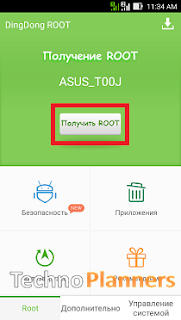
Step 3. Open it and Press the button to root.
Download here
http://bit.ly/1NQ7KKI
Congratulation i hope it will work for your device, If it not working please share it with us. We will fix it ASAP. You can also check out How to Connect PC Link using Wifi Connection on Asus Zenfone.
Go to link download

Saturday, May 13, 2017
Fix Bootloop on any ASUS Zenfone 4 5 6 Selfie Laser etc
Fix Bootloop on any ASUS Zenfone 4 5 6 Selfie Laser etc
Hello Guys In this tutorial i will tell you How to Fix Bootloop on ASUS Zenfone 4, 5, 6 , Selfie, Laser, Zenfone. If your device going in bootloop that means your device can not start or its show ASUS logo and shutdown and reboot again and aging or it is showing boot animation continuously. That is means you have to fix bootloop issue on your zenfone.
If you can not find the firmware for your device. Please comment below and Ill update as soon as possible.
Requirement
- ADB Driver
- Intel Driver
- ADB Fastboot Tool
- Zenfone Stock ROM (Download All Reqirement files from end of the post)
- Windows PC
Install Drivers on your PC
Download Intel driver from end of the post. Once it downloaded on your PC, Install it on your PC like normal software.Install ADB Driver
- Download ADB Drivers from end of the post.
- Connect your zenfone in recovery mode
- Run ADB Driver, and Click on Install button
- Done
How to fix bootloop on Zenfone
- Now Download ADB Fastboot tool and extract it on your PC desktop.
- Copy Stock ROM zip file in extracted adb folder.
- Now Open Stock ROM using winrar and extract boot.img and recovery.img from it.
- Boot your device in droidboot mode. By Press and hold Power off button after vibrate suddenly press Volume Up button.
- Connect your device with PC using ASUS USB Data cable.
- Now open adb folder and press SHIFT + Right Mouse Button and select open command here.
- Now Type below command one by one and hit enter after each line
- After successfully flash both files dont close CMD Window.
- Now select recovery mode then press power button ( if u dont know how to open recovery mode using droidboot mode then Power off your device and Press and hold Power off button after vibrate suddenly press Volume Down button. May be it show no command or show android image, Now Press and hold Volume down and Volume Up button again and again it will show you recovery menu.
- Now select apply update from adb option
- Now type below command and hit enter then hit enter.
fastboot flash recovery recovery.img
fastboot flash boot boot.img
fastboot flash fastboot fastboot.img
adb sideload filename.zip
If you can not find the firmware for your device. Please comment below and Ill update as soon as possible.
Download here
Intel USB Drivers- http://intel.ly/1hCwP2o
ADB Drivers- http://bit.ly/2cUnlTg
ADB TOOL- http://bit.ly/2dGYSjQ
Zenfone 5 Firmware- http://bit.ly/1NIe9wm
Go to link download
Thursday, March 30, 2017
Timaya Takes An Adorable Selfie With Little Comedian Emmanuela
Timaya Takes An Adorable Selfie With Little Comedian Emmanuela
Her uncle Mark Angel shared this pics. Emmanuela is really loved by all celebrities in the Nigeria Entertainment Industry and they shared this photo below

Go to link download
Monday, March 27, 2017
CM 14 0 Nougat 7 0 for Zenfone Selfie ROM GApps
CM 14 0 Nougat 7 0 for Zenfone Selfie ROM GApps
In this post I will tell you how to Install Android Nougat 7.0 on Zenfone Seifie/ Zenfone 2 Laser. This is not an official update from ASUS it is a custom ROM for Zenfone Selfie and Zenfone 2 Laser. There is minor bugs and issues on this ROM before installing this ROM, please read Working and not working features. Also check out more tutorial on ASUS Zenfone Page.
Requirement
- TWRP Recovery Pre-Installed on Device
- Device at-least charge 50%
Supported Devices:
- Asus Zenfone 2 Laser ZE551KL (Z00T / Z00TD)
- Asus Zenfone 2 Laser ZE601KL (Z011 / Z011D / Z011DD)
- Asus Zenfone Selfie ZD551KL (Z00U / Z00UD / Z00UDH)
Whats working on this ROM:
- RIL (Calls, SMS, Data)
- Wifi
- Bluetooth
- Sensors
- Flash
- Audio (Record and Playback)
- Led
- GPS
- Camera (Videos And Photos)
- Boots
- Video Playback
Whats not working:
- Video recording not working on stock Camera but It works using Google Camera
- Loud Speakers not working on ZE601KL model
- SELinux is permissive
Before Update
- Before you go to the next step please make sure backup your personal photos, Games, contract and other data. Because after update your internal storage decreases the size of storing it can fail to update or remove some files from your Android phone.
- Make sure before update currently your device running on latest Lollipop firmware. Otherwise, it will be failed to update your device. You can also check out More Tutorials on ASUS Zenfones device
How to Install Nougat 7.0 on Zenfone Selfie/ Zenfone 2 Laser
- Download ROM from end of post
- Download GApps for Nougat ROM
- Copy Both ROM and GApps zip files on your device internal or external storage
- Power off your device
- Boot into recovery mode by pressing and hold power button + Volume Down button
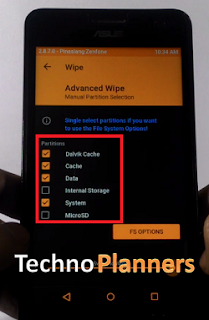
- Once your device Reboot into TWRP recovery Tap on ‘Wipe", Select Advance Wipe and marks the Dalvik Cache, Cache and Data option from the list and Swipe to Wipe.
- Go back and select "Install", Now find the ROM file from the internal storage and flash it. Wait until its finished.
- Similarly, Flash GApps
- Once it shows Successfully Install/Complete, Go back and Select wipe, Go to Advanced Wipe and select "Dalvik Cache and Cache" and do wipe.
- Once its done, Reboot your device.
Download here
ROM- http://bit.ly/2cCGJU3
For first boot it can take up to 10 - 15 minutes for making catch files on this device. So, please keep patience. You can also check out How to .If you find other bugs or issue with ROM, please drop your comment below. Thank you and have a nice day.
Go to link download
Subscribe to:
Posts (Atom)