Showing posts with label gapps. Show all posts
Showing posts with label gapps. Show all posts
Thursday, May 4, 2017
GApps for Android 7 0 7 1 Nougat Aroma Super Stock Full Pico etc
GApps for Android 7 0 7 1 Nougat Aroma Super Stock Full Pico etc
Hello Guys, Recently We are ready to share Google GApps for Nougat Android 7.0, CM14 CynogenMod and its supported all Custom ROM for which based on the Nougat Operating System. At this time this GApps 100% compatible with CM14 ROMs and all other Nougat Custom ROM.

Google Release there new Nougat source code for developers and Custom ROM developers being development of Nougat Custom ROM for your Android Phone. Once you Install CM14/ other Nougat ROM on your device then you needed to also Install GApps for Google Play Store, Google Play Service and other required Apps for your device.
GApps for Android 7.0 Nougat Comes in different variants like Aroma, Super, Stock, Full, Mini, Micro, Nano, Pico and There is one more GApps with the name of TVStock GApps it will upcoming for nougat. If your device has boring Boot animation on your custom ROM. You can also check out our new post about Get Android Nougat Boot Animation on any Android.
From this post you can download any GApps for Nougat ROM. These files are running on the latest version. If you find anything help full from this Techno Planners blog, Please share this post on your social profile. It will help us to grow. Also Drop your comment below with your review. Thank you and have a nice day.
Google Release there new Nougat source code for developers and Custom ROM developers being development of Nougat Custom ROM for your Android Phone. Once you Install CM14/ other Nougat ROM on your device then you needed to also Install GApps for Google Play Store, Google Play Service and other required Apps for your device.
GApps for Android 7.0 Nougat Comes in different variants like Aroma, Super, Stock, Full, Mini, Micro, Nano, Pico and There is one more GApps with the name of TVStock GApps it will upcoming for nougat. If your device has boring Boot animation on your custom ROM. You can also check out our new post about Get Android Nougat Boot Animation on any Android.
Requirement for Installing GApps
- Custom Nougat ROM already Installed on the device
- GApps ZIP file
- TWRP/CWM Recovery
- Battery level atleat 30% charged
How to Flash GApps on Android 7.0 Nougat
- First, download GApps for Nougat/CM14 from end of post link given.
- Copy it onto your device Internal/External Storage.
- Now Power off and boot your phone into Recovery Mode.
- Once your device Reboot into TWRP recovery Tap on ‘Install’ and select Gapps package
- Or if you are using the CWM Recovery Select> install zip from SD card and select Gapps package.
- Once the GApps flashed on your device.
- Clear cache and Dalvik Cache after flashing the Gapps.
- Finally Reboot your device
How to Download Right file of GApps for Nougat
- Go to GApps download link page from below link

- From Platform, Select your device processor, for example, if your device have ARM64 bit processor then select ARM64 bit Option.

- From Android, Select Android 7.0

- From Variant, Select any package file according to your requirement

- Then tap on Red Download Button

Download here
http://bit.ly/1JOWjUq
From this post you can download any GApps for Nougat ROM. These files are running on the latest version. If you find anything help full from this Techno Planners blog, Please share this post on your social profile. It will help us to grow. Also Drop your comment below with your review. Thank you and have a nice day.
Go to link download

Google GApps For Lineage OS ROM Aroma Super Stock Full Mini Micro Nano Pico
Google GApps For Lineage OS ROM Aroma Super Stock Full Mini Micro Nano Pico
Hello Guys, As we know as CynogenMod is no more and Now Lineage OS will provide all custom ROMs for other devices and its supported all Custom ROM for which based on the Nougat/Marshmallow. At this time this GApps for Lineage OS available for download and all other Nougat/Marshmallow Custom ROM.
GApps for Lineage OS Comes in different variants like Aroma, Super, Stock, Full, Mini, Micro, Nano, Pico and There is one more GApps with the name of TV Stock GApps it will upcoming for nougat.
Requirement
How to Download Right file of GApps for your device
From this post you can download any GApps for Custom ROM Lineage OS ROM. These files are running on the latest version. If you find anything help full from this Techno Planners blog, Please share this post on your social profile. It will help us to grow. Also Drop your comment below with your review. Thank you and have a nice day.
GApps for Lineage OS Comes in different variants like Aroma, Super, Stock, Full, Mini, Micro, Nano, Pico and There is one more GApps with the name of TV Stock GApps it will upcoming for nougat.
Requirement
- TWRP/CWM Recovery for installing GApps
- Device level atleat 30% charged
How to Flash GApps on Lineage OS ROM
- First, download GApps for Lineage ROM from end of post link given.
- Copy it onto your device Internal/External Storage.
- Now Power off and boot your phone into Recovery Mode.
- Once your device Reboot into TWRP recovery Tap on ‘Install’ and select Gapps package
- Or if you are using the CWM Recovery Select> install zip from SD card and select Gapps package.
- Once the GApps flashed on your device.
- Clear cache and Dalvik Cache after flashing the Gapps.
- Finally Reboot your device
How to Download Right file of GApps for your device
- Go to GApps download link page from below link
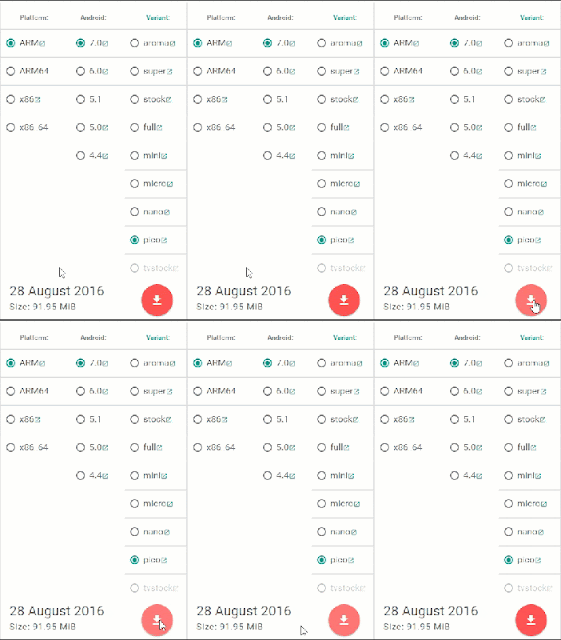
- From Platform, Select your device processor, for example, if your device have ARM64 bit processor then select ARM64 bit Option.

- From Android, Select your Android version

- From Varient, Select any package file according to your requirement

- Then tap on the Red Download Button
Download here
http://bit.ly/1JOWjUq
From this post you can download any GApps for Custom ROM Lineage OS ROM. These files are running on the latest version. If you find anything help full from this Techno Planners blog, Please share this post on your social profile. It will help us to grow. Also Drop your comment below with your review. Thank you and have a nice day.
Go to link download
Monday, March 27, 2017
CM 14 0 Nougat 7 0 for Zenfone Selfie ROM GApps
CM 14 0 Nougat 7 0 for Zenfone Selfie ROM GApps
In this post I will tell you how to Install Android Nougat 7.0 on Zenfone Seifie/ Zenfone 2 Laser. This is not an official update from ASUS it is a custom ROM for Zenfone Selfie and Zenfone 2 Laser. There is minor bugs and issues on this ROM before installing this ROM, please read Working and not working features. Also check out more tutorial on ASUS Zenfone Page.
Requirement
- TWRP Recovery Pre-Installed on Device
- Device at-least charge 50%
Supported Devices:
- Asus Zenfone 2 Laser ZE551KL (Z00T / Z00TD)
- Asus Zenfone 2 Laser ZE601KL (Z011 / Z011D / Z011DD)
- Asus Zenfone Selfie ZD551KL (Z00U / Z00UD / Z00UDH)
Whats working on this ROM:
- RIL (Calls, SMS, Data)
- Wifi
- Bluetooth
- Sensors
- Flash
- Audio (Record and Playback)
- Led
- GPS
- Camera (Videos And Photos)
- Boots
- Video Playback
Whats not working:
- Video recording not working on stock Camera but It works using Google Camera
- Loud Speakers not working on ZE601KL model
- SELinux is permissive
Before Update
- Before you go to the next step please make sure backup your personal photos, Games, contract and other data. Because after update your internal storage decreases the size of storing it can fail to update or remove some files from your Android phone.
- Make sure before update currently your device running on latest Lollipop firmware. Otherwise, it will be failed to update your device. You can also check out More Tutorials on ASUS Zenfones device
How to Install Nougat 7.0 on Zenfone Selfie/ Zenfone 2 Laser
- Download ROM from end of post
- Download GApps for Nougat ROM
- Copy Both ROM and GApps zip files on your device internal or external storage
- Power off your device
- Boot into recovery mode by pressing and hold power button + Volume Down button
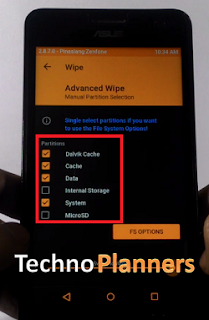
- Once your device Reboot into TWRP recovery Tap on ‘Wipe", Select Advance Wipe and marks the Dalvik Cache, Cache and Data option from the list and Swipe to Wipe.
- Go back and select "Install", Now find the ROM file from the internal storage and flash it. Wait until its finished.
- Similarly, Flash GApps
- Once it shows Successfully Install/Complete, Go back and Select wipe, Go to Advanced Wipe and select "Dalvik Cache and Cache" and do wipe.
- Once its done, Reboot your device.
Download here
ROM- http://bit.ly/2cCGJU3
For first boot it can take up to 10 - 15 minutes for making catch files on this device. So, please keep patience. You can also check out How to .If you find other bugs or issue with ROM, please drop your comment below. Thank you and have a nice day.
Go to link download
Subscribe to:
Posts (Atom)