Showing posts with label redmi. Show all posts
Showing posts with label redmi. Show all posts
Thursday, May 25, 2017
CM13 Marshmallow for Redmi Note 3 Custom ROM
CM13 Marshmallow for Redmi Note 3 Custom ROM
Hello Guys AS we know as CM13 for Redmi Note 3 is available right now and In this post I will show you how you can install Custom CM13 ROM on Redmi Note 3 phones. This ROM only for snapdragon processor, please do not try it on other model otherwise it can be brick your device like system files corrupt and bootloop. Try this ROM at your own risk and I am not responsible for any damage. And it can void your warranty. Read about Custom ROMs for Redmi Note 3 List Lollipop and Marshmallow.
With this method you can flash any ROM on your device without any problem. If you find any bug in this CM13 for Redmi Note 3 ROM. Please drop your comment below, we will reply as soon as possible and share bugs and features with our other visitors. You can also check out How to Install Android N 7.0 Boot Animation on any Android.Thank you and have a nice day.
Read It before installing
Before Install any Custom ROM make sure the device has ROOT access and Custom TWRP recovery is already flashed on the device. If you are already flash TWRP on your device you are ready to go to the next step.Working Features
- Audio work fine in Loud Speaker and earphone
- Working WIFI
- Working Bluetooth
- Camera
- RIL
- GPS
- FM Radio
- Fingerprint FIXED
Requirement
- Android 6.01 ROM (Download ROM and GApps from end of post)
- GApps
- TWRP Recovery
How to Install CM13 ROM on Redmi Note 3
- First download ROM and GApps from end of post.
- Copy both ROM and GApps on your device Internal/SD Card storage
- Power Off your device
- Reboot into recovery mode by pressing and hold Volume Down + Power button.
- Once your device successfully reboots into TWRP Recovery
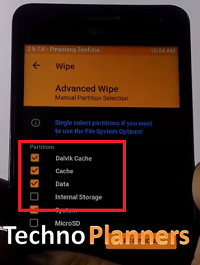
- Now, Tap on Wipe > Advance Wipe, Select Wipe cache, Dalvik cache, System and Data option then Swipe to wipe.
- Go back, Tap on Install and find the ROM zip file and flash it.
- Once ROM successfully flashed, Similarly, flash GApps.
- Once ROM successfully flashed, Go back and wipe cache & Dalvik cache again and Reboot your device.
- Done
Download here
GApps- bit.do/GAppsforRN3
ROM- http://bit.do/CM134RN3
With this method you can flash any ROM on your device without any problem. If you find any bug in this CM13 for Redmi Note 3 ROM. Please drop your comment below, we will reply as soon as possible and share bugs and features with our other visitors. You can also check out How to Install Android N 7.0 Boot Animation on any Android.Thank you and have a nice day.
Go to link download

Tuesday, May 2, 2017
Custom ROMs List for Redmi Note 3 Lollipop Marshmallow
Custom ROMs List for Redmi Note 3 Lollipop Marshmallow
Now we are sharing the List of best stable Custom ROM for Xiaomi Redmi note 3. Lots of users search on Google Custom ROMs for Redmi note 3 for their device. Here we are providing Custom ROMs with their features and Bugs information. So, it helps to decide which is a better ROM for you.

CyanogenMOD 13.0 for Xiaomi Redmi Note 3 Snapdragon
CyanogenMOD 13 ROM which based on Android 6.0.x Marshmallow with kernel Linux 3.10.x and this current ROM status on Stable. This ROM is Better than MIUI, thats for sure. And there is No lagging. NO bugs with Ultra smooth performance. That is why this is Better than MIUI. Also Read How to Get CM13 for Redmi Note 3 Custom ROM.
Working
- FM Radio
- Fingerprint Sensor
- Bluetooth
- Wifi
- Audio
- Camera
- RIL
- GPS
Status: Stable
CyanogenMod 12.1 for Xiaomi Redmi Note 3 Snapdragon
CyanogenMod 12.1 ROM which based on Android 5.1.1 Lollipop with kernel Linux 3.10.x and this ROM status on BETA. And At this time finger Print Sensor not working and that is possible there are lots of hidden bugs in this ROM and this ROM has not tested completely.
Working
- Camera
- Audio
- RIL
- Wifi
- Bluetooth
- Other basic stuff
Bugs
- Fingerprint Not Working
ROM OS Version: 5.1.x Lollipop
ROM Kernel: Linux 3.10.x
Based On: CyanogenMod
Resurrection Remix for Xiaomi Redmi Note 3
Resurrection Remix ROM which based on Android 6.0.1 Marshmallow and CyanogenMOD. This ROM status of testing thats why at this time we are not providing bug report.
RR Features
- 3 Finger Swipe Screenshot Gesture
- SystemUI Tuner -Enabled By default
- Audio FX
- Lock Screen Auto-rotate
- List View Animations
- App Circle Bar
- Lock Screen
- Animate Dim -Dim
- Brightness Slider -Enable/Disable
- Navigation Bar [Can be Enabled/Disable Navbar]
- Toast Animations
- Quick Settings Drag able Tiles
- Advanced Reboot Menu
- Carrier Label Switches
- System Animations
- Double Tap Power button to enable Camera gesture
- Battery Bar customization Color
- Status Bar Weather
- Weather Position (Left/right)
There is some List of best Custom ROMs for Xiomi Redmin Note 3. At this time, we are choosing three ROMs CM13.0, CM12.1 and Resurrection Remix for Xiaomi Redmi Note 3. Please Share more information and bug report of this ROMs with our other visitors.
Go to link download
Friday, April 28, 2017
Download Nougat ROM for Redmi Note 3 Google Apps
Download Nougat ROM for Redmi Note 3 Google Apps
Hello Guys, Now Nougat ROM available for Redmi Note 3. This is not an official update from MIUI it is a custom Nougat ROM for Redmi Note 3. There is minor bugs and issues on this ROM before installing this ROM, Please read Working and not working features.
For first boot it can take up to 10 - 15 minutes for making catch files on this device. So, please keep patience. You can also check out How to .If you find other bugs or issue with ROM, please drop your comment below. Thank you and have a nice day.
Requirement
- TWRP Recovery Pre-Installed on Device
- Device at-least charge 50%
- Nougat ROM (Download all files from end of the post, Link given)
- GApps for Nougat
Whats working :
- Boots
- RIL (Calls, SMS, Data)
- Fingerprint (FPC1020 only)
- Wi-Fi
- Bluetooth
- Camera (Image Capture only)
- Video Playback
- Audio
- Sensors
- Flash
- LED
- GPS
Whats not working
- Video recording
- SELinux is permissive
Before Installing
Before you go to the next step please make sure backup your personal photos, Games, contract and other data.How to Install Nougat 7.0 on Redmi Note 3
- Download ROM from end of post
- Download GApps for Nougat ROM
- Copy Both ROM and GApps zip files on your device internal or external storage
- Power off your device
- Boot device into recovery mode.
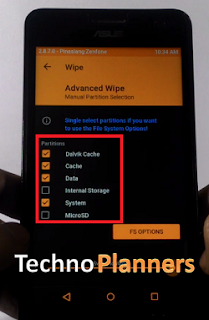
- Once your device Reboot into TWRP recovery mode Tap on ‘Wipe", Select Advance Wipe and marks the Dalvik Cache, Cache, Data and System option from the list and Swipe to Wipe.
- Go back and select "Install", Now find the ROM file from the internal storage and flash it. Wait until its finished.
- Similarly, Flash GApps
- Once it shows Successfully Install/Complete, Go back and Select wipe, Go to Advanced Wipe and select "Dalvik Cache and Cache" and do wipe.
- Once its done, Reboot your device.
Download here
ROM- http://bit.ly/2enGHRM
For first boot it can take up to 10 - 15 minutes for making catch files on this device. So, please keep patience. You can also check out How to .If you find other bugs or issue with ROM, please drop your comment below. Thank you and have a nice day.
Go to link download
Wednesday, March 15, 2017
Lineage OS For Redmi Note 3 Android Nougat 7 1 1 ROM
Lineage OS For Redmi Note 3 Android Nougat 7 1 1 ROM
Hello Guys, In this post we are sharing guide about how to install lineage OS ROM nougat for redmi note 3. So As we know as the Lineage OS nougat recipe is ready for Redmi Note 3. So, now in this post I will show you how to install Lineage OS on Redmi Note 3. This method is tested, So you can install it on your device without any issue, and am sure it will 100% work for you, but do it at your own risk and I am not responsible for any damage.
Pre-Requirement
Note
Before flash any ROM, Make a full backup of your device using TWRP Recovery. With these backup you can restore your device in previous condition with full internal store data and applications.
Pre-Requirement
- TWRP Recovery Installed
- Device at least 40% charged
- Lineage OS ROM (Download all files from end of the post)
- GApps for Lineage OS
Note
Before flash any ROM, Make a full backup of your device using TWRP Recovery. With these backup you can restore your device in previous condition with full internal store data and applications.
How to Install Lineage OS on Redmi Note 3
- First Download Lineage OS ROM from the end of the post link given in red color.
- Second Download GApps for Lineage OS.
- Copy both zip files in your device internal storage/external storage.
- Switch Off your device
- Boot your device into TWRP recovery mode using your buttons
- Once your device successfully boot into TWRP Recovery Mode. Just Select Wipe > Advance Wipe > Check "Dalvik Catch", "Catch", "Data", "System" option and swipe to confirm wipe.
- Lineage OS For Redmi Note 3
- Go back and Tap on Install option and find ROM file and flash it.
- Once its done, Similarly, flash GApps.
- Go back, Tap on Wipe and select factory reset option
- Reboot your device
Download here for Kenzo
ROM- http://bit.ly/2hOzdXq
Congratulation, After first boot you can use your redmi note 3 with Lineage OS Nougat ROM. Please note first, boot can take up to 10 minutes So, Please dont turn off your device. Please share this ROM on your social media sites. You can also check out How to flash Nougat on Zenfone 5. Thank you and have a nice day.
Go to link download
Tuesday, March 7, 2017
How to update Redmi 2 Prime to Android 7 1 Nougat
How to update Redmi 2 Prime to Android 7 1 Nougat
Xiaomi going to release the MIUI 9 update for Redmi 2/Prime but miui9 based on android 6.0 marshmallow. And here you can install android 7.0 nougat update on Redmi 2 without any problem. This nougat update based on CM14.1 with pure android experience like mote g4 plus or android x86 operating system. Also CM14.1 ROM optimized for hardcore gameplay you can play all games like asphalt 8, Mortal combat 5 etc. Without any lagging issue. This method and ROM tested on this device, but please do it with your own risk I am not responsible for any damage. You can also install xposed on nougat ROM.
ROM Version Info
Congratulations, After first boot you can use nougat update on the Redmi 2/Prime device. Please note first boot can take upto 15 to 20 minutes. So, Please keep patience. You can also read about Nougat for Redmi Note 3.
Requirement
- Nougat ROM for Redmi 2/Prime (Download from end of post)
- GApps for Nougat ROM
- TWRP Recovery pre installed
Working features
- WIFI
- Bluetooth
- Camera
- IR Sensor
- Fast Charge
- Double-Tap to Wake
- Vibration intensity control
- Ambient Display
- Advanced Doze options
- DT2W
- OTA Update
- Animation Control
- App Circle Sidebar
- Lock screen Weather
- Screen recorder settings
Bugs and not working features
- No RAM management
- Sometimes apps have been stopping automatically
- Heating on 8GB variant
- Battery optimization not working properly
- After every reboot it is optimizing apps, then starts the system
- Slim launcher crashes sometimes
- No music player
- VOLTE does not work
How to Update Redmi 2/Prime to Android 7.0 Nougat
- First of all download the ROM zip file from the end of the post link given in red highlighted color.
- Now download Google GApps for Nougat.
- You can download it on your laptop/desktop PC or download it directly on your device.
- Now transfer ROM and GApps zip files on your redmi 2 /Prime with the help of data cable or wireless file transfer apps.
- Now boot your device into recovery mode by pressing and holding volume up and power button at the same time.
- Once you reach the recovery mode, you will see many options there.
- Now tap on Wipe, Select Wipe data, wipe cache partition and wipe Dalvik cache option and wipe it
- Go back and select install option, then find and select the ROM zip file
- Similarly, Install GApps
- After installation, Tap on a wipe and factory reset your device.
- Reboot your device
- DONE
Download here
ROM- http://bit.ly/2ftOSLg
ROM Version Info
- Status: Beta
- ROM OS Version: 7.1 Nougat
- ROM Kernel: Linux 3.10.x
- Beta Release Date: 2016-10-29
- Created 2016-10-10
- Last Updated 2016-10-28
Congratulations, After first boot you can use nougat update on the Redmi 2/Prime device. Please note first boot can take upto 15 to 20 minutes. So, Please keep patience. You can also read about Nougat for Redmi Note 3.
Go to link download
Subscribe to:
Posts (Atom)