Showing posts with label lineage. Show all posts
Showing posts with label lineage. Show all posts
Thursday, May 4, 2017
Google GApps For Lineage OS ROM Aroma Super Stock Full Mini Micro Nano Pico
Google GApps For Lineage OS ROM Aroma Super Stock Full Mini Micro Nano Pico
Hello Guys, As we know as CynogenMod is no more and Now Lineage OS will provide all custom ROMs for other devices and its supported all Custom ROM for which based on the Nougat/Marshmallow. At this time this GApps for Lineage OS available for download and all other Nougat/Marshmallow Custom ROM.
GApps for Lineage OS Comes in different variants like Aroma, Super, Stock, Full, Mini, Micro, Nano, Pico and There is one more GApps with the name of TV Stock GApps it will upcoming for nougat.
Requirement
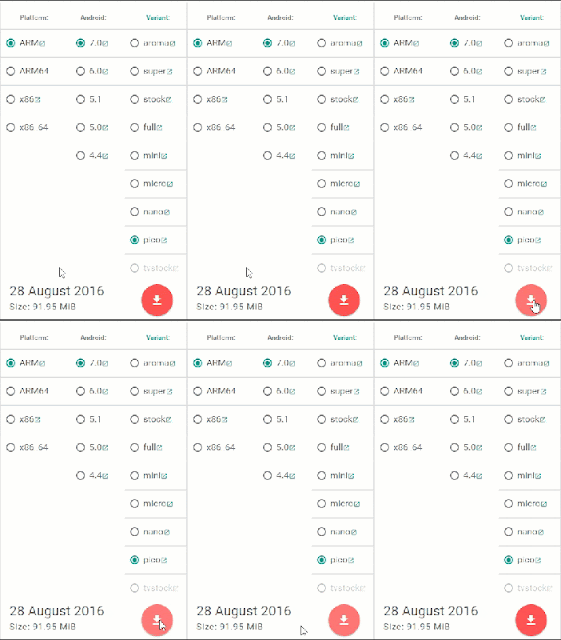
How to Download Right file of GApps for your device
From this post you can download any GApps for Custom ROM Lineage OS ROM. These files are running on the latest version. If you find anything help full from this Techno Planners blog, Please share this post on your social profile. It will help us to grow. Also Drop your comment below with your review. Thank you and have a nice day.
GApps for Lineage OS Comes in different variants like Aroma, Super, Stock, Full, Mini, Micro, Nano, Pico and There is one more GApps with the name of TV Stock GApps it will upcoming for nougat.
Requirement
- TWRP/CWM Recovery for installing GApps
- Device level atleat 30% charged
How to Flash GApps on Lineage OS ROM
- First, download GApps for Lineage ROM from end of post link given.
- Copy it onto your device Internal/External Storage.
- Now Power off and boot your phone into Recovery Mode.
- Once your device Reboot into TWRP recovery Tap on ‘Install’ and select Gapps package
- Or if you are using the CWM Recovery Select> install zip from SD card and select Gapps package.
- Once the GApps flashed on your device.
- Clear cache and Dalvik Cache after flashing the Gapps.
- Finally Reboot your device
How to Download Right file of GApps for your device
- Go to GApps download link page from below link
- From Platform, Select your device processor, for example, if your device have ARM64 bit processor then select ARM64 bit Option.

- From Android, Select your Android version

- From Varient, Select any package file according to your requirement

- Then tap on the Red Download Button
Download here
http://bit.ly/1JOWjUq
From this post you can download any GApps for Custom ROM Lineage OS ROM. These files are running on the latest version. If you find anything help full from this Techno Planners blog, Please share this post on your social profile. It will help us to grow. Also Drop your comment below with your review. Thank you and have a nice day.
Go to link download

Tuesday, May 2, 2017
Lineage OS Zenfone Max Nougat 7 1 1 ROM Download
Lineage OS Zenfone Max Nougat 7 1 1 ROM Download
In this post we are sharing guide about how to install Lineage OS ROM Zenfone Max. So As we know as the Lineage OS nougat recipe is ready for Zenfone Max. So, now in this post I will show you how to install Lineage OS on Zenfone Max. This method is tested by other users, but I am sure it will 100% work for you, but do it at your own risk and I am not responsible for any damage.
Pre-Requirement
Before flash any ROM, Make a full backup of your device using TWRP Recovery. With these backup you can restore your device in previous condition with full internal store data and applications.
Congratulation, After first boot you can use your Zenfone Max with Lineage OS Nougat ROM. You can also check out Lineage OS Zenfone 2 Laser Please note first, boot can take up to 10 minutes So, Please dont turn off your device. Please share this ROM on your social media sites. Thank you and have a nice day.
Pre-Requirement
- Custom TWRP Recovery
- Device at least 50% charged
- Lineage OS ROM (Download all files from end of the post)
- Google Apps for Lineage OS
Before flash any ROM, Make a full backup of your device using TWRP Recovery. With these backup you can restore your device in previous condition with full internal store data and applications.
How to Install Lineage OS on Zenfone Max
- First Download Lineage OS ROM from the end of the post link given in red color.
- Second Download GApps for Lineage OS.
- Copy both zip files in your device internal storage/external storage.
- Switch Off your device
- Boot your device into TWRP recovery mode using your buttons
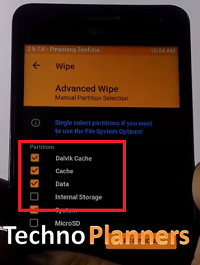
- Once your device successfully boot into TWRP Recovery Mode. Just Select Wipe > Advance Wipe > Check "Dalvik Catch", "Catch", "Data", "System" option and swipe to confirm wipe.
- Go back and Tap on Install option and find ROM file and flash it.
- Once its done, Similarly, flash GApps.
- Go back, Tap on Wipe and select factory reset option
- Reboot your device
- Done.
Download here
ROM- http://bit.ly/2iG9bEq
Congratulation, After first boot you can use your Zenfone Max with Lineage OS Nougat ROM. You can also check out Lineage OS Zenfone 2 Laser Please note first, boot can take up to 10 minutes So, Please dont turn off your device. Please share this ROM on your social media sites. Thank you and have a nice day.
Go to link download
Friday, April 14, 2017
Download Lineage OS ROM Zenfone 2 Laser Android Nougat 7 1 1
Download Lineage OS ROM Zenfone 2 Laser Android Nougat 7 1 1
Hello Guys, In this post we are sharing guide about how to install lineage OS ROM nougat on Asus zenfone 2 laser. So As we know as the Lineage OS nougat recipe is ready for Zenfone 2 laser. So, now in this post I will show you how to install Lineage OS on Zenfone 2 Laser. This method is tested by other users, but I am sure it will 100% work for you, but do it at your own risk and I am not responsible for any damage.
Pre-Requirement
Before flash any ROM, Make a full backup of your device using TWRP Recovery. With these backup you can restore your device in previous condition with full internal store data and applications.
Congratulation, After first boot you can use your zenfone 2 laser with Lineage OS Nougat ROM. Please note first, boot can take up to 10 minutes So, Please dont turn off your device. Please share this ROM on your social media sites. You can also check out How to flash CM14.1 Nougat on Zenfone 2 laser. Thank you and have a nice day.
Pre-Requirement
- Custom TWRP Recovery
- Device at least 50% charged
- Lineage OS ROM (Download all files from end of the post)
- GApps for Lineage OS
Before flash any ROM, Make a full backup of your device using TWRP Recovery. With these backup you can restore your device in previous condition with full internal store data and applications.
How to Install Lineage OS on Zenfone 2 Laser
- First Download Lineage OS ROM from the end of the post link given in red color.
- Second Download GApps for Lineage OS.
- Copy both zip files in your device internal storage/external storage.
- Switch Off your device
- Boot your device into TWRP recovery mode using your buttons
- Once your device successfully boot into TWRP Recovery Mode. Just Select Wipe > Advance Wipe > Check "Dalvik Catch", "Catch", "Data", "System" option and swipe to confirm wipe.
- Go back and Tap on Install option and find ROM file and flash it.
- Once its done, Similarly, flash GApps.
- Go back, Tap on Wipe and select factory reset option
- Reboot your device
- Done.
Download here
ROM- http://bit.ly/2hIFnKp
Congratulation, After first boot you can use your zenfone 2 laser with Lineage OS Nougat ROM. Please note first, boot can take up to 10 minutes So, Please dont turn off your device. Please share this ROM on your social media sites. You can also check out How to flash CM14.1 Nougat on Zenfone 2 laser. Thank you and have a nice day.
Go to link download
Friday, April 7, 2017
Lineage OS Nougat ROM Zenfone 5 Android 7 1 1 How to Install
Lineage OS Nougat ROM Zenfone 5 Android 7 1 1 How to Install
In preview post we talk about Lineage OS for Zenfone Max. Now, Today in this post we talk about Lineage OS Android Nougat ROM for ASUS Zenfone 5/6. Unfortunately, This is not an official update from Lineage OS and There are some bugs and error like FM Radio, GPS and playing some video file formate. Currently, This ROM status on the experiment so, maybe there are more bugs and issue. If you detect any bug or problem with this ROM, please share it with us and our other visitors. Please do it with your own risk, I am not responsible for any damage.
Requirement
TWRP Recovery
Before upgrading to marshmallow you have to flash Custom TWRP Recovery. If you have pre-install recovery you can skip this step otherwise use this tutorial to How to Install TWRP on Zenfone your device.
Bugs/Not Working:
Backup
Requirement
- Lineage OS ROM (Download all files from end of post)
- GApps for Lineage OS
- Desktop/PC
TWRP Recovery
Before upgrading to marshmallow you have to flash Custom TWRP Recovery. If you have pre-install recovery you can skip this step otherwise use this tutorial to How to Install TWRP on Zenfone your device.
Bugs/Not Working:
- FM Radio Not working
- some video formats do not play so accurate
- problems with some apps like UC Browser
- GPS not working
Backup
- Before flashing the ROM update make a backup using TWRP recovery.
- Power off Your Zenfone
- Open TWRP recovery mode by using the Power + Volume Down button.
- Tap on Backup then Slide left to right from Swipe to backup button
- Once the Backup Complete reboot device normally and Copy TWRP folder on your PC/Computer.
How to install Nougat on Zenfone 5
- Download LineageOS ROM and GApps from end of the post.
- Copy ROM and GApps zip file in your device storage.
- Turn off your Zenfone
- Boot your device into Recovery mode using Power + Volume DOWN button.
- Once your device successfully boot into TWRP Recovery Mode. Just Select Wipe > Advance Wipe > Check "Dalvik Catch", "Catch", "Data", "System" option and swipe to confirm wipe.
- Tap Install and flash the ROM zip file.
- Go back and flash the GApps.
- Tap Wipe > Advance Wipe, Select dalvik cache, data, internal storage
- Once its done, Reboot your device.
Download here
ROM- http://bit.ly/2ivD8HH
For first boot it can take up to 10 minutes for making cache file, Please dont turn off your device in that stage. Before you go, read about How to Install Android Nougat on Zenfone 5 and Resurrection Remix Nougat on Zenfone 5 T00J/T00F. Please Share this Tutorial with your friends and family.
For first boot it can take up to 10 minutes for making cache file, Please dont turn off your device in that stage. Before you go, read about How to Install Android Nougat on Zenfone 5 and Resurrection Remix Nougat on Zenfone 5 T00J/T00F. Please Share this Tutorial with your friends and family.
Go to link download
Sunday, March 26, 2017
Lineage OS For Moto G3 2015 Nougat 7 1 1 Ultimate
Lineage OS For Moto G3 2015 Nougat 7 1 1 Ultimate
In this post we are sharing how to install Android lineage OS for Moto g4 2015. As we know as Android Nougat release for moto g4 plus and lots of other devices. But unfortunately Official Nougat not available for Moto G3 but you can install custom Lineage OS for Moto G3. This method tested Moto G3 but do it at your own risk and i am not responsible for any damage.
Requirements
TWRP Recovery
Before Installing the Custom ROM on your device. You have to flash custom recovery TWRP Touch Recovery on your Moto G3.
Congratulation, Now you can enjoy the Android Nougat on your moto g3. First boot can take up to 5 - 10 Minutes. So, Please do not power off your device in this stage. Once the boot complete it will ask for WiFi or mobile data connection, Google Account etc. Fill all information if you want to access Play Store/ or Gmail Applications on your device.
Requirements
- Android Nougat ROM
- GApps for Nougat
TWRP Recovery
Before Installing the Custom ROM on your device. You have to flash custom recovery TWRP Touch Recovery on your Moto G3.
How to Install Nougat on Moto G3
- First, You have to download requirements material for the device from the end of the post.
- Download Pico Gapps for Nougat from here
- Now, From your PC copy ROM and GApps zip files and paste it in your moto internal storage using data cable/ or using wireless application for example: Share-it/ Super Beam.
- Unplug your device from PC and Turn off it.
- Reboot into recovery mode by using the Power + Volume Down button.
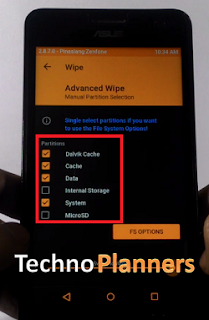
- Select Wipe > Advance Wipe > check the data, dalvik cache, catch, system and swipe to wipe it.
- Tap Install and find the ROM zip file and flash it
- Similarly, flash GApps on your device.
- After flashing, you should format old files from in the TWRP.
- Go back and select Wipe > Advance Wipe > check the data, dalvik cache, data, internal storage (optional).
- Now, finally Reboot your device.
Download here
ROM- http://bit.ly/2jCjzjk
Congratulation, Now you can enjoy the Android Nougat on your moto g3. First boot can take up to 5 - 10 Minutes. So, Please do not power off your device in this stage. Once the boot complete it will ask for WiFi or mobile data connection, Google Account etc. Fill all information if you want to access Play Store/ or Gmail Applications on your device.
Go to link download
Wednesday, March 15, 2017
Lineage OS For Redmi Note 3 Android Nougat 7 1 1 ROM
Lineage OS For Redmi Note 3 Android Nougat 7 1 1 ROM
Hello Guys, In this post we are sharing guide about how to install lineage OS ROM nougat for redmi note 3. So As we know as the Lineage OS nougat recipe is ready for Redmi Note 3. So, now in this post I will show you how to install Lineage OS on Redmi Note 3. This method is tested, So you can install it on your device without any issue, and am sure it will 100% work for you, but do it at your own risk and I am not responsible for any damage.
Pre-Requirement
Note
Before flash any ROM, Make a full backup of your device using TWRP Recovery. With these backup you can restore your device in previous condition with full internal store data and applications.
Pre-Requirement
- TWRP Recovery Installed
- Device at least 40% charged
- Lineage OS ROM (Download all files from end of the post)
- GApps for Lineage OS
Note
Before flash any ROM, Make a full backup of your device using TWRP Recovery. With these backup you can restore your device in previous condition with full internal store data and applications.
How to Install Lineage OS on Redmi Note 3
- First Download Lineage OS ROM from the end of the post link given in red color.
- Second Download GApps for Lineage OS.
- Copy both zip files in your device internal storage/external storage.
- Switch Off your device
- Boot your device into TWRP recovery mode using your buttons
- Once your device successfully boot into TWRP Recovery Mode. Just Select Wipe > Advance Wipe > Check "Dalvik Catch", "Catch", "Data", "System" option and swipe to confirm wipe.
- Lineage OS For Redmi Note 3
- Go back and Tap on Install option and find ROM file and flash it.
- Once its done, Similarly, flash GApps.
- Go back, Tap on Wipe and select factory reset option
- Reboot your device
Download here for Kenzo
ROM- http://bit.ly/2hOzdXq
Congratulation, After first boot you can use your redmi note 3 with Lineage OS Nougat ROM. Please note first, boot can take up to 10 minutes So, Please dont turn off your device. Please share this ROM on your social media sites. You can also check out How to flash Nougat on Zenfone 5. Thank you and have a nice day.
Go to link download
Subscribe to:
Posts (Atom)