Tuesday, May 9, 2017
Root L5 E610 E612 E615 E617 optimus 3D Max P720
Root L5 E610 E612 E615 E617 optimus 3D Max P720
 Root para LG L5 E610/E612/E615/E617 Optimus 3D Max P720/P720H/P725
1. Baixe o arquivo e descompacte-o (criar uma pasta na área de trabalho chamada L5_root ou o que quiser): kit Root ( o4xr.zip )
2.Download "IS11LG_SystemBackupTest.signed.apk" anexado abaixo e copiar para a raiz do seu telefone (armazenamento interno)
3. No telefone habilite essas duas opções :
Em "Opções -> Segurança" , habilitar "Fontes desconhecidas"
Em "Para Desenvolvedores" habilite "Debug USB"
4. Instalar "IS11LG_SystemBackupTest.signed.apk"
5. Em seguida, abra o "SystemBackupTest" instalado e não o feche.
Segure o botão de ligar e reinicie o dispositivo.
6. Quando o telefone tiver reinicializado completamente , conecte seu telefone ao computador via USB (Nota: deve ser opção de somente carregar bateria )
Se ficar reinicializando sem parar , aguarde pelo logo da LG, depois que ele aparecer conte de 3 a 4 minutos, então aperte a tecla de ligar
7. Na pasta que você criou no passo 1 (L5_root) o4xr executar o arquivo root.bat,
esperar até que o script ser executado e o telefone irá reiniciar.
8. Então no telefone, abrir o Google Play Store e procure o "SuperSU"
Faça o Upgrade do "SuperSU", e em seguida, abra o programa pede atualizações ... Clique em OK para
9. Atualizar o binário SU ...
10. Agora você tem um root. Você pode excluir a aplicação SystemBackupTest ...
Go to link download

Sunday, May 7, 2017
Download Opera Max Best Android Data Saving App For Your Device
Download Opera Max Best Android Data Saving App For Your Device
I know most of you already know about this app, its called Opera Max.. it can help a great deal in saving your data usage on your android as you browse stuff. As you know, Opera Mini itself is the best data compressing app in the world. This Opera max app is a must have.
Key Features:
- Save megabytes of data while using popular apps like YouTube, Netflix, Line, Instagram, Google Chrome, Gaana, Pandora, Slacker Radio, and more
- Monitor apps to see which ones consume the most data
- Manage your data consumption and extend your data plan- Boost Wi-Fi speeds and save more data
- Control how much data you use while roaming- Prevent apps from using background data

Go to link download
Tuesday, May 2, 2017
Lineage OS Zenfone Max Nougat 7 1 1 ROM Download
Lineage OS Zenfone Max Nougat 7 1 1 ROM Download
Pre-Requirement
- Custom TWRP Recovery
- Device at least 50% charged
- Lineage OS ROM (Download all files from end of the post)
- Google Apps for Lineage OS
Before flash any ROM, Make a full backup of your device using TWRP Recovery. With these backup you can restore your device in previous condition with full internal store data and applications.
How to Install Lineage OS on Zenfone Max
- First Download Lineage OS ROM from the end of the post link given in red color.
- Second Download GApps for Lineage OS.
- Copy both zip files in your device internal storage/external storage.
- Switch Off your device
- Boot your device into TWRP recovery mode using your buttons
- Once your device successfully boot into TWRP Recovery Mode. Just Select Wipe > Advance Wipe > Check "Dalvik Catch", "Catch", "Data", "System" option and swipe to confirm wipe.
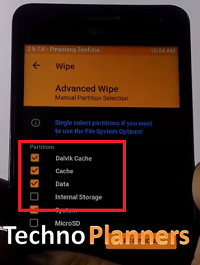
- Go back and Tap on Install option and find ROM file and flash it.
- Once its done, Similarly, flash GApps.
- Go back, Tap on Wipe and select factory reset option
- Reboot your device
- Done.
Congratulation, After first boot you can use your Zenfone Max with Lineage OS Nougat ROM. You can also check out Lineage OS Zenfone 2 Laser Please note first, boot can take up to 10 minutes So, Please dont turn off your device. Please share this ROM on your social media sites. Thank you and have a nice day.
Go to link download
Tuesday, April 25, 2017
How to Root Zenfone Max ZC550KL The Complete Guide
How to Root Zenfone Max ZC550KL The Complete Guide
- Zenfone Max
- Windows PC
- Data Cable
- USB Drivers
- Root_Tool (Download all files from end of post)
How to Root Zenfone Max
- Download Root Tool from the end of the post, Extract it on your desktop using WinRAR or other extractor tool.
- Now, Connect your device with PC using data cable
- Open Root Tool folder that you extract to your desktop.
- Click on Root.bat for Windows OS and Root.su for Linux OS.

- It will show back Commend Window on your screen and promot for Press any Key to continue and any key from your keyboard. And it will start to root your device. Please do not disconnect your device from PC while this process is running. It can harm your device.
- Once it is done, Your device auto reboot.
How to UnRoot Zenfone Max
- Use above steps from 1 to 4
- Click on UnRoot.bat for Windows OS and UnRoot.su for Linux OS.

- Wait until it is done.
Congratulation, Now you can access any Rooted Android Application on your Zenfone Max. This Update tutorial about Root Zenfone Max. Do you know the Android OS release their new version for Android Users and there are lots of amazing features, but one is my favorite Android N Setting Menu on any Android Lollipop and Marshmallow. Thank you using Techno Planners I hope you enjoy this Tutorial. If yes, Please share this post.
Go to link download